


The Driving For Dollars App
2.844.00 Reviews
App Specs
- Version
- 2.1.2
- Updated On
- License
- Free
- Downloads
- 10,000+
- Developer
- Driving For Dollars App LLC
- Categories
- Business
- Platform
- Android
Screenshots
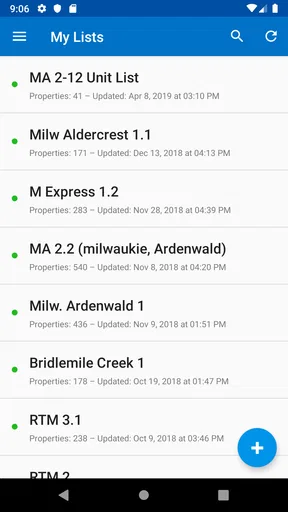
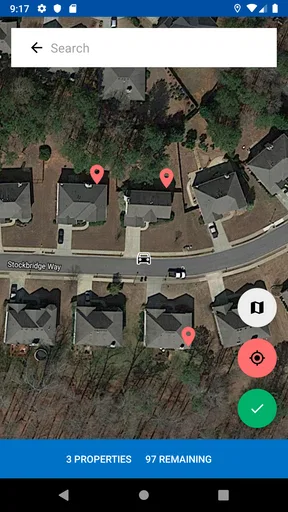
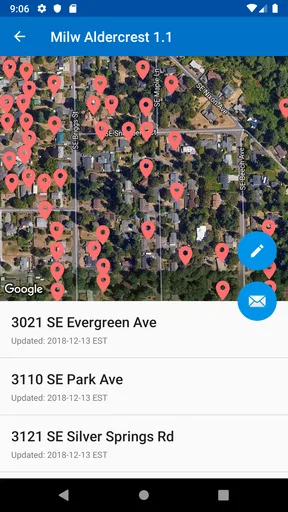
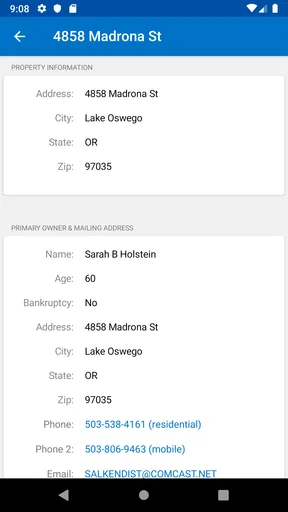
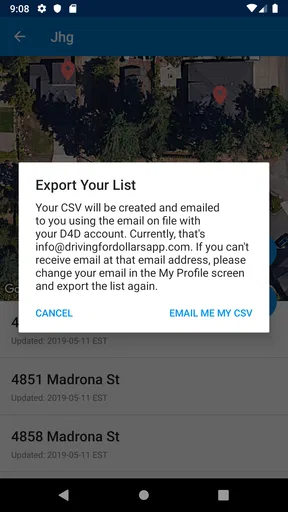
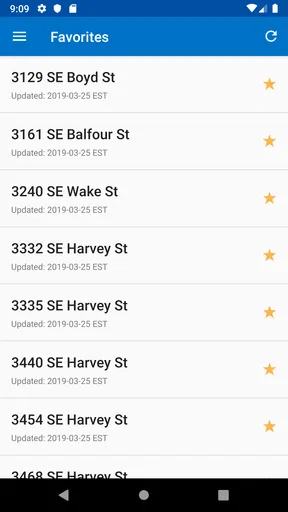
 Analysis by AppCompare
I approached Driving For Dollars App as a practical tool for people who find potential real-estate leads while moving around a neighborhood. Its purpose is easy to understand: connect property scouting with direct-mail outreach instead of leaving notes in a separate notebook and trying to reconstruct the route later. That sounds simple, but the usefulness depends heavily on how carefully you set up your process and how much information you expect the app to handle for you.
This is a free business app from Driving For Dollars App LLC, aimed at real-estate investors and other users who prospect for properties in person. It is rated for Everyone, so the audience is broad, although the actual use case is quite specialized. The current version is 2.1.2, and it runs on Android devices using version 6.0 or later. I would not treat it as a general property-search app; its value is closer to a field notebook connected to a direct-mail routine.
Where the real friction appears during a scouting trip
The first thing I noticed is that the app makes most sense when I already have a clear scouting goal. If I open it without deciding what I am looking for, the experience can feel less helpful than a conventional real-estate platform. Those platforms are built around listings, prices, photos, and search filters. This app is built around what I observe from the street and what I plan to do afterward.
That difference explains why some users may feel stuck early. A person expecting a polished property database may look for listing-style details and find the workflow unfamiliar. A person who wants to mark possible opportunities while driving through a target area will understand the concept much faster. I found it more useful to think of each observation as the beginning of a follow-up task, not as a complete property record.
There is also a natural tension between speed and accuracy. When I am moving through a neighborhood, I want to record a candidate quickly. When I slow down to enter too much detail, I lose the rhythm of scouting. My practical approach is to capture only the information needed to recognize the property later, then review the record when I am parked. That small change prevents the app from becoming a distraction during the drive.
The safest habit is to use the app only when the vehicle is stopped. A passenger can handle notes while someone else drives, but I would not operate a phone while moving. The app is intended to support field work, not to replace safe driving habits. If I am alone, I make a mental note of the location, pull over legally, and then complete the entry.
Why a saved lead is not the same as a qualified lead
One of the more important trade-offs is that a property that catches my eye is only a prospect. A neglected exterior, an overgrown yard, or an apparent vacancy may justify a closer look, but none of those observations proves ownership status, motivation, value, or legal eligibility for outreach. The app can help me organize the next step; it cannot turn a quick visual impression into a finished investment decision.
Worth Reading Before You Choose

Flipboard Shows What News Apps Must Do Beyond the Feed

Switching to Android Auto Means Rethinking Your Driving Routine

Google Calendar Makes a Crowded Week Easier to Manage

Ludo King Makes the Most of the Minutes Between Plans

Baby Panda World Brings Quick Play to Modern Phones, but Its Game Library Feels Busy

ESPN’s Live Game View Makes Following Close Games Easier
I would therefore separate scouting from evaluation. During the first pass, I record the candidate and a short identifying note. Later, I verify the address and investigate it through appropriate public or professional sources. Only after that review would I decide whether a direct-mail action is sensible. This two-stage workflow is more reliable than treating every saved location as a ready-to-contact opportunity.
Setup checks that prevent avoidable problems
Before taking the app into the field, I would install it on a supported Android device and open it while connected to a dependable network. The minimum operating-system requirement is Android 6.0, but compatibility alone does not guarantee a smooth outing. A phone with an older system, limited storage, an unstable connection, or aggressive battery management may create problems that look like app failures.
I would begin with a short test close to home. The goal is not to scout seriously; it is to learn how the app behaves when I create, review, and revisit a candidate. This test also reveals whether I can recognize saved entries later without relying on memory. Spending a few minutes on that rehearsal is much better than discovering an unfamiliar workflow halfway through a neighborhood route.
Location handling deserves particular attention. If a record appears in the wrong place, I would first check the phone’s location setting, move to an area with a clearer view of the sky, and wait briefly before trying again. Buildings, covered parking areas, dense streets, and weak signals can all make positioning less precise. I would avoid repeatedly tapping the same control in frustration; that can create uncertainty about whether one action succeeded or several records were made.
Network conditions are another basic check. I would open the app before leaving, confirm that the initial screen loads normally, and avoid assuming that every part of the workflow will behave identically without connectivity. If I expect to work in areas with unreliable service, I would test that exact situation before depending on the app for a full route. The important point is to distinguish a connection problem from a problem with the application itself.
Notifications and battery settings can also affect a field session, even when the app itself is functioning. If the phone enters a restrictive power mode, location-related behavior may become less consistent. I would start with a charged device, close unnecessary applications, and keep a simple backup note for addresses I consider especially important. That backup is not a replacement for the app; it is protection against losing the only record of a promising observation.
How I would prepare the work area
I would choose one compact neighborhood rather than attempting a large, scattered route. A smaller area makes it easier to remember where I have already been and to review candidates in a sensible order. It also gives me a better chance of noticing patterns, such as several properties that need follow-up in the same block or nearby streets that deserve a second pass.
Before starting, I would decide what qualifies as a candidate. For example, I might focus on visible maintenance issues, signs of extended vacancy, or properties that deserve ownership research. The exact criteria are personal, but writing them down keeps the session consistent. Without a rule, I would probably save too many marginal properties and create more administrative work than useful leads.
I would also prepare a follow-up routine before collecting anything. A saved address should eventually move into one of three states: investigate, discard, or contact through an appropriate lawful process. This simple classification prevents the app from becoming a storage box filled with old observations. It is one of the biggest practical differences between using a scouting tool deliberately and merely dropping pins whenever something looks interesting.
Recovering the workflow when something goes wrong
When an entry does not appear as expected, I would avoid immediately assuming that the record has vanished. First, I would check whether the action actually completed, then revisit the relevant screen and look for the candidate using the information I entered. If the location is wrong, I would compare it with the physical address and my own notes before creating another entry. Duplicate records are often harder to clean up than a single incomplete one.
If the app appears frozen, my recovery sequence would be simple: stop interacting with it, confirm the phone still has a usable connection, close and reopen the app, and repeat the test with one low-importance candidate. I would not begin by deleting records or reinstalling. Those actions can make it harder to understand what happened and may remove information that I still need.
A useful field habit is to pause after each important action. I would save one candidate, check that it can be found again, and only then continue. This feels slower at first, but it prevents a long route from ending with uncertainty about which properties were actually recorded. For a business workflow, confidence in the record is more valuable than shaving a few seconds off every entry.
If a session becomes unreliable, I would switch to a temporary written record containing the address, approximate position, and a brief observation. Once the phone and connection are stable, I could transfer only the worthwhile candidates. This is especially sensible when I am working alone and cannot safely troubleshoot while on the road. A backup process also helps separate a technical interruption from a bad prospecting decision.
Keeping direct-mail work organized after scouting
The app’s direct-mail focus makes follow-up discipline particularly important. I would not send something immediately just because a property was saved. First I would verify the address, identify the appropriate recipient through lawful sources, and check that my planned communication complies with applicable rules. The app can support organization, but responsibility for accurate and respectful outreach remains with me.
I would keep the scouting note factual and neutral. “Needs ownership research” is more useful than an emotional judgment about the property or the people connected to it. A neutral note helps me make a better decision later and reduces the chance that a quick impression will unfairly shape the outreach. It also makes the record easier to understand if I review it several weeks afterward.
Another practical insight is to review candidates in batches instead of interrupting every route with research. After a scouting session, I would sort the records by neighborhood or priority, remove obvious false positives, and investigate the strongest possibilities first. That approach reduces context switching and makes any later mailing process more deliberate. It also exposes whether the route is generating genuinely useful prospects or simply a large number of weak ones.
When the app is not the cause of the problem
Real-estate scouting involves several outside variables, so not every disappointing result points to the application. A property may look vacant but be occupied. A visible repair issue may have an innocent explanation. An address may be difficult to identify from the street. A mail piece may fail to produce a response for reasons unrelated to how the lead was recorded. I would judge the app on its ability to support my process, not on outcomes controlled by owners, markets, or postal delivery.
Likewise, the app is not the right substitute for property research platforms, mapping tools, valuation resources, or professional advice. Those alternatives may be better when I need listing data, comparable sales, ownership history, or a broad market overview. This tool is strongest at the moment when I am physically observing an area and want to preserve a lead for later work.
I would also skip it if my real goal is simply to browse homes for sale. A standard real-estate search app is more natural for comparing listed properties, viewing asking prices, and planning conventional buyer activity. I would skip it as well if I do not intend to perform follow-up research. Without a clear next step, the app risks becoming a collection of unreviewed observations.
Privacy and professionalism matter here too. I would avoid recording sensitive personal details that are unnecessary for evaluating a property, and I would never treat an exterior observation as permission to intrude on private space. The most responsible use is limited to lawful public observation, careful verification, and respectful communication. That mindset improves the quality of the workflow as much as any technical setting.
What the store numbers suggest about expectations
The app has passed ten thousand installs, but its average rating is 2.8 from around sixty-five ratings and forty-four written reviews. I read that as a reason to set realistic expectations rather than as an automatic rejection. The concept may fit a narrow group very well, while users looking for a polished all-purpose real-estate platform may be disappointed by the specialized workflow or by setup friction.
The download itself is free, which makes a small test worthwhile. However, in-app purchases range from $19.99 to $399.99 per item, so I would explore the basic experience carefully before paying for anything. I would want to understand exactly which part of my workflow a purchase improves and whether I will use that capability often enough to justify the cost. A free installation should not be confused with a completely cost-free business process.
Those purchase levels also make the app more suitable for users who already have a defined prospecting plan than for casual curiosity. If I am only experimenting with real-estate investing, I would begin with the free experience and a small route. If I am already mailing consistently and need a field-oriented system, I would evaluate paid options against the time they save, not against the excitement of collecting more leads.
My practical verdict after using it as a field tool
I see Driving For Dollars App as a focused companion for a particular real-estate workflow: spotting possible opportunities in person, recording them, and organizing the research that follows. Its best quality is the connection between physical scouting and later direct-mail work. That connection is more useful than a generic notes app when I am deliberately building a neighborhood-based prospect list.
Its weaknesses are just as practical. The workflow may feel unfamiliar to people expecting listing-style information, location and connectivity can complicate field use, and the app cannot validate the investment quality of a property for me. The mixed rating reinforces my view that I should test it with a small route before making it central to my business. I would also keep a backup note for high-value observations and review every candidate before beginning outreach.
For a new user, my recommended routine is straightforward: install it on a supported Android phone, test it near home, choose a compact area, define what counts as a candidate, record only essential observations while safely stopped, and review everything afterward. Then compare the time saved with the cost of any optional purchase. That process answers the most important questions quickly: whether the app fits the way I scout, whether my phone handles the workflow reliably, and whether I will actually follow through on the records I create.
I would recommend it to an investor who likes driving neighborhoods, notices property conditions firsthand, and is prepared to do careful research before mailing. I would recommend a conventional real-estate search or mapping solution instead to someone who mainly wants listings, market comparisons, or broad property discovery. My final view is that it is useful when treated as a disciplined scouting log, not as an automated deal-finding machine. Used with that expectation, the free entry point makes it reasonable to try; used without a follow-up system, it is unlikely to solve the real problem.
Pros
- Helps organize property leads while driving through unfamiliar neighborhoods.
- Photo and note tools make it easy to record visible property details.
- Useful for investors targeting vacant or distressed homes.
- Map-based workflow keeps prospecting locations easy to revisit.
- Can support more consistent follow-up than using paper notes alone.
Cons
- Accurate results depend heavily on the quality of local property data.
- Frequent GPS use may noticeably reduce your phone’s battery life.
- Some useful features may require a paid plan or additional subscription.
- Entering detailed notes while parked can make the process time-consuming.
- Availability and accuracy of owner information can vary by location.
FAQs for The Driving For Dollars App
What is the Driving For Dollars app used for?
Driving For Dollars is a real estate investing app designed to help users find potential off-market properties while driving through neighborhoods. Investors can mark houses that appear vacant, distressed, or in need of repairs, save property details, add notes and photos, and organize leads for later research. It is mainly intended for house flippers, wholesalers, landlords, and other property professionals.
How does the app help me identify potential investment properties?
The app lets you view properties on a map and record addresses that may be worth investigating. While driving, you can flag homes with signs such as overgrown yards, boarded windows, visible damage, or deferred maintenance. Afterward, the saved leads can be reviewed and researched, although the app does not guarantee that a property owner wants to sell or that every lead will become a profitable deal.
Can I use Driving For Dollars without an internet connection?
The app relies on location services, map data, and account-based features, so a reliable internet connection is generally recommended. Some information may remain available temporarily through cached map data, but offline functionality can be limited depending on the device and app version. Before visiting neighborhoods, it is a good idea to check your connection, enable GPS, and confirm that your data plan can support map usage.
Does Driving For Dollars provide property owner information and contact details?
Driving For Dollars may offer tools or integrations that help investors research ownership and locate contact information, but the exact features can depend on the subscription plan, location, and current version of the service. Users should verify all records through reliable public or professional sources before contacting anyone. Personal data must also be handled responsibly and in accordance with applicable privacy, solicitation, and communication laws.
Is Driving For Dollars free to download and use?
The app may be available to download at no initial cost, but some of its most useful investing tools can require a paid subscription, credits, or an upgraded plan. Potential costs may include lead management, property research, skip tracing, marketing, or team features. Check the current pricing and trial terms in the official app listing before signing up, especially if billing begins automatically after a promotional period.


